
MA3_Load V1.2 officially released on 2026-06-07, now the new version is V1.6:
Please re-download MA3_load and run it to automatically unlock 1000 universes.
http://down.hahan123.com/down_server/SuperLightBox/grandMA3_onPC/
This MA3_Load is currently at version 1.6, can unlock 1000 universe 512000 parameters for MA3 2.5.1.1, 2.5.1.0, 2.5.0.3, 2.4.2.2, 2.3.2.0, 2.3.1.1, 2.3.0.4, 2.1.1.5 version.
How to use:
1: install MA3 from Original, don’t copy any plugin to MA3 directory.
2: Run the MA3_load program, setup in MA3_Load, and then you can just run MA3_load directly afterward. Check out the FAQ Q22 video tutorial for setup instructions
Attention: In MA3, choose 127.0.0.1 or the IP of your other MA devices for the Session IP, but do not select the SL04 box’s network card IP, otherwise MA3 will send unnecessary network data to the box, which will occupy the SL04 box’s network bandwidth for a long time. Be careful! Why do this? Please refer to the instructions in MA2.
Since this is an official unlocking method, MA3 must be correctly set up for Art-Net/sACN to output data!
How to configure Art-Net / sACN in MA3:
DMX Protocols -> Enable Output, choose the interface where you want the Art-Net/sACN data to be output, Light up the ‘Send Art-Net If IdleMaster’ button, under Data, make sure to change Enabled from No to Yes (right-click mouse to change), and set Amount to the number of universes you want to output. If you’re just controlling the actual lights through the SL04 box, set the quantity to 4, don’t set more.
Note: The official Artnet/sACN will only output to one network card and will not output to 127.0.0.1 simultaneously, so the same network card needs to be selected in 3D software. In addition, because our box’s network bandwidth is only 10M, if it is just for 3D rehearsal, it is recommended to choose the built-in network card. If you need our box to control actual lighting, then our box’s network card must be selected. At any time, there can only be Artnet data on one network card.
Note: Although it is possible to unlock 1000 universe, setting too many universes will consume a large amount of network bandwidth and computer resources. It is recommended to set the output quantity according to actual needs.
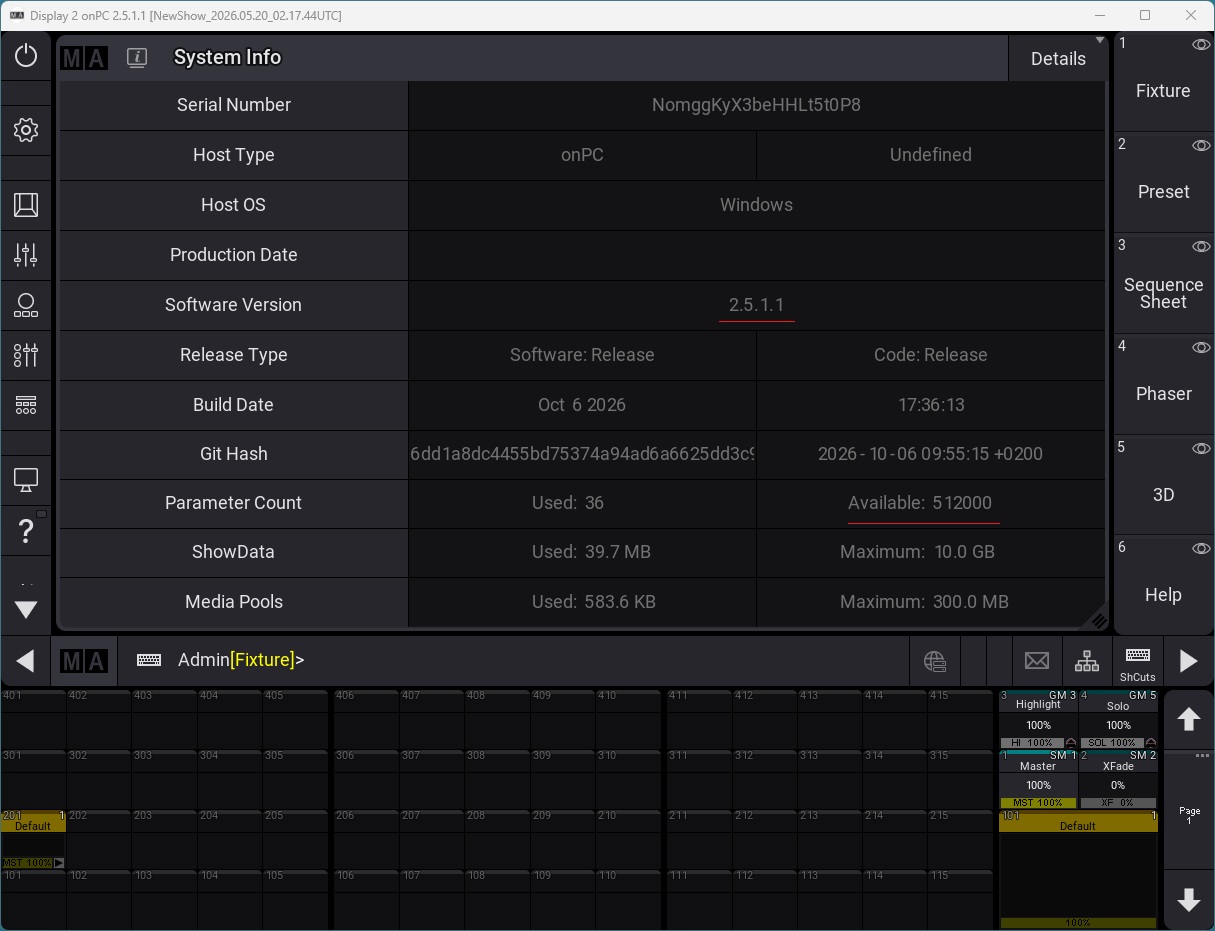
How to check MA3 unlocking parameters:
Click anywhere on the screen in MA3, Add Window will appear, select More to add the System Info window,
and you can see Parameter Count -> Available, which shows the number of unlocks.
As long as you can see the parameter count here, it indicates that the unlock is successful!
You might encounter an issue where opening old version show files in the new version of MA3 results in universe that were occupied in the old file not outputting in the new version, while empty universe still output.
The solution: I generally don’t tell this to just anyone, but you just need to close the MA3 session and reopen it, and that will fix the problem. For issues with no Artnet output, it is also recommended to try closing the session multiple times and reconnecting, which usually resolves the problem.
or you can create new show to test artne/sACN output.
hahan
2026-10-16
Recommended to watch in full screen:
Watch on Youtube:
https://youtu.be/svwvEHiioFE
Watch on Bilibili:
https://www.bilibili.com/video/BV1c9EK6KEft/?share_source=copy_web&vd_source=c4866446886ad2cbccf1f5c62a754782