
A customer used a centralized control system to send packets over a UDP network, calling DMX files on the SL04 box’s TF card to control the fountain.
A strange phenomenon occurred: the box’s WebApp could play the DMX files normally and control the fountain properly, but the centralized control system could only play the first file, and the second file wouldn’t work at all, which was baffling.
Later, it was discovered that the customer’s centralized control system strings did not include a terminating character ‘0’ by default. After adding ‘0’, it worked immediately.
Note: regardless of whether it’s C, Java, JS, or Python, a normal string ends with ‘0’ (NULL) as a terminator, meaning the programming language automatically adds a 0 at the end of the string. The customer’s centralized control programming software did not add ‘0’ by default, which caused this issue.
This case is relatively special, and I am pointing it out specifically to make everyone aware of this detail.
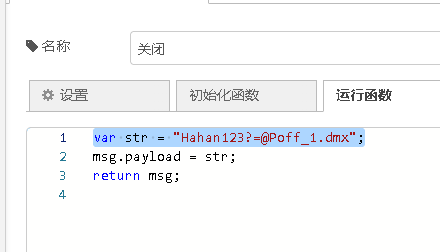
The string in the central control is written incorrectly, it does not have a 0 terminator.
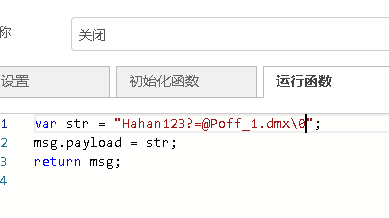
The correct way to write a string in the central control is to add 0 as the terminator.
How does the SL04 box control the fountain?
1: Treat each fountain nozzle as a single-channel light, with the opening and closing of the fountain nozzles controlled via a DMX decoder board.
2: Use professional software to design the fountain effects (open/close or pan/tilt), and capture them into a DMX file through the SL04 box.
3: Use the central control’s network interface or RS485/232 to call and play the DMX file according to our development documentation.
Click here to view the SL04 development documentation
Click here to view the SL04 secondary development source code (including web dashboard development methods)
Youtube: